VVerdoos
Log in
PN

Prateek Navani

@prateek

5 Posts0 Followers0 Following
PN
Prateek Navani@prateek· Thursday at 4:59 AM

Cloud GPU pricing in India: a buyer's checklist for AI teams I have watched more than a few Indian AI teams sign up for a GPU cloud provider based on a single number on a pricing page, only to open their first invoice and find it looks nothing like what they expected. This is because the headline rate almost never tells the whole story. Cloud GPU pricing in India has genuinely matured over the last couple of years, with real INR billing and real local infrastructure now available. But the gap between what a pricing page promises and what actually lands on your bill can still run anywhere from 30% to 70%, sometimes more. Let's see, exactly what to check before you commit to a provider. Why does the sticker price almost never match your actual bill? Because the number on a pricing page usually covers compute alone, and compute is only one part of what you actually pay for. Storage for your datasets and model checkpoints gets billed separately Moving data out of a provider's network, known as egress, often comes with its own fee Idle time on on-demand instances usually bills at the full rate, whether you are actively using the GPU or not Billing in USD instead of INR adds currency exposure that shifts your actual cost month to month What are the specific hidden costs that catch teams off guard most often? A few show up again and again across providers. Network egress fees: Commonly ₹7 to ₹20 per GB on hyperscalers NVMe storage charges: Typically ₹8 to ₹40 per GB per month depending on the tier Currency conversion exposure: Adding roughly 5-8% for teams billed in USD rather than INR Compliance documentation fees: DPDP Act compliance paperwork is sometimes sold as a paid add-on rather than included A checklist for you, before picking a provider Here is the list I actually run through, in order of what tends to matter most. Compute rate per GPU-hour, not per node, so you can compare apples to apples across different instance sizes Storage pricing per GB-month, especially if you are working with large training datasets Egress fees, for any workflow that moves data across regions or between clouds and for public network charges and keep some additional buffers. Billing currency. Since INR billing removes an entire category of cost uncertainty DPDP compliance, and whether the documentation is included or billed separately Idle billing behaviour, since some providers charge full rate for idle time and others do not Minimum commitment or contract lock-in, which matters a lot more for early-stage teams than established ones Actual GPU availability, since a cheap rate means nothing if you are stuck on a waitlist Which of these matters most if you are a small team just starting out? Compute rate and lock-in terms, more than anything else on the list. Early on, you need the flexibility to scale up or down without being penalized, and you need pricing that does not assume you already know your exact usage pattern for the next year. Compliance and enterprise-grade documentation tend to matter more once you are selling to larger customers who ask for it directly. How much can pricing actually vary for the exact same GPU across providers? More than most people expect. Here is a real comparison for a single month of 8x H100 GPU access. Provider Monthly cost for 8x H100 India-native GPU cloud Roughly ₹16 lakh AWS (Mumbai region) Roughly ₹42.9 lakh Azure Roughly ₹38.6 lakh Google Cloud Roughly ₹58.8 lakh That is the difference between a serious infrastructure line item and something closer to unaffordable for most early-stage teams. Does this spread hold true for workstation-class cards too, like the RTX PRO 6000? Yes, though the numbers scale down since it is a single card rather than an eight-GPU cluster. Renting typically runs somewhere between ₹1.2 and 1.65 lakh a month depending on the CPU and RAM tier attached to it. The RTX PRO 6000 price in India for outright purchase, by comparison, currently sits around ₹14 to 17 lakh before GST for the card alone, before you add a proper chassis, power, and cooling on top. For anyone still deciding which path fits their usage pattern, that gap alone is usually worth running the numbers on before committing either way. Is there a genuinely cheaper option most teams do not know about? Yes, and it is worth checking eligibility for before comparing anything else. The IndiaAI Mission offers subsidized compute access, currently priced around ₹67 to ₹92 per GPU-hour for eligible teams, well below standard commercial rates. The programme has empaneled more than 38,000 GPUs as of mid-2026, a meaningful share of them H100 or H200-class hardware. Who actually qualifies for this subsidized pricing? Mostly startups, researchers, and academic institutions that register through the programme and meet its eligibility criteria. It is not automatically available to every commercial workload, so it is worth checking directly rather than assuming your team qualifies, but for teams that do, it is genuinely the cheapest legitimate compute available in the country right now. When does it actually make sense to stick with a hyperscaler despite the price gap? More often than the raw numbers suggest, honestly. If your data, identity systems, and existing pipeline already live entirely inside AWS, Azure, or Google Cloud, the cross-cloud egress fees and integration overhead of moving your GPU workload elsewhere can eat into or even erase the savings on paper. The general rule that tends to hold up is using a hyperscaler when your workload is tightly glued to that cloud's other services, and a domestic provider or specialist GPU cloud when the GPU job stands largely on its own. Conclusion The listed rate on any GPU cloud pricing page is a starting point, not the real answer. Run through egress, storage, currency, and compliance costs before comparing providers, check whether you qualify for subsidized compute through the IndiaAI Mission, and only default to a hyperscaler if your existing infrastructure genuinely depends on staying there. That process takes an extra hour of research, and it is usually the difference between a predictable monthly bill and an unpleasant surprise on your first invoice. Frequently asked questions 1. Is INR billing actually cheaper, or just more predictable? Both, typically. INR billing removes currency conversion exposure entirely, and India-native providers hosting infrastructure domestically also tend to price more competitively than hyperscalers running the same workload out of a shared regional data center. 2. Do all Indian GPU cloud providers include DPDP compliance by default? No, this varies significantly. Some India-native providers include compliance documentation as standard, while hyperscalers and some smaller providers treat it as a paid add-on. This is worth confirming directly rather than assuming it is included. 3. Is it worth negotiating pricing directly with a provider instead of using listed rates? Often, yes, especially for sustained usage. Listed on-demand rates are usually the highest tier available, and many providers offer meaningfully better pricing for reserved capacity or longer commitments once you have a clearer sense of your actual usage pattern.

PN
Prateek Navani@prateek· September 8 at 5:06 AM

Everyone talks about how powerful Kubernetes is. Nobody talks about how much it costs to run it yourself. It costs you in money as well as in time, in people, in failed weekends, and in engineering hours that could have gone toward building your actual product. If your team is managing its own Kubernetes cluster, this article is for you. Because the sticker price of self-managed K8s is almost never the full picture. Which part of Kubernetes costs nobody puts in the budget When teams decide to run Kubernetes themselves, the calculation usually goes like this: "We'll save money by not paying for a managed service. How hard can it be?" Here's what that calculation almost always misses: 1. Someone has to own it: Kubernetes doesn't run itself. You need at least one engineer who understands the control plane, knows how to upgrade the cluster without breaking production, and can debug networking issues at 2 am. In India, a DevOps engineer with that skill set costs anywhere from Rs. 12 to 25 lakhs a year. That's before you count the opportunity cost of pulling them off feature work every time the cluster needs attention. 2. Upgrades are a job in themselves: Kubernetes releases a new minor version every few months. Each version has a support window. If you fall too far behind, you're running unsupported software with known security vulnerabilities. Staying current means testing upgrades in a staging environment, validating your workloads, and then executing the upgrade carefully across the control plane and every worker node. For most teams, this is a multi-day exercise every few months. 3. etcd is your cluster's memory. And it needs babysitting. etcd is the distributed key-value store that holds all your cluster state. If it goes down and you don't have a working backup, your cluster has no memory of what should be running. Setting up etcd backups, testing restores, and maintaining a high-availability etcd setup is a real engineering task. Most teams skip parts of this until something breaks. 4. Certificate rotation. Kubernetes uses TLS certificates internally. Those certificates expire. When they expire in production, things break, sometimes quietly at first, then suddenly everywhere. Tracking expiry dates and rotating certificates on schedule sounds simple until it isn't. The hidden tax on every incident When your self-managed cluster has a problem, you own the entire investigation. Is it the control plane? A node? A network policy? A misconfigured admission webhook? Etcd lag? The kube-proxy rules? You start from scratch every time. A mid-sized Indian startup that runs its own cluster will typically spend 15 to 20 hours per month on cluster maintenance, upgrades, and incident response. That's a conservative estimate. For teams without a dedicated DevOps person, that time comes directly out of product development. Now multiply that by your average fully-loaded engineering cost per hour. That's your real Kubernetes bill. What "we'll figure it out" actually costs Here's a pattern that plays out often with early-stage teams. Months 1 to 3: The cluster is set up. Things work. The team is proud. Months 4 to 6: The first real incident. A node goes down. Someone spends two days figuring out why etcd is behaving oddly. A cert expires. The fix takes a day. Months 7 to 12: The cluster is three minor versions behind. Nobody wants to touch the upgrade because the last one caused issues. Security patches are being skipped. A senior engineer has become the unofficial Kubernetes person and resents it. Month 12 and beyond: The team seriously starts looking at managed options. This is not a failure of skill. It's what happens when infrastructure complexity compounds over time and nobody's primary job is to keep up with it. What actually changes when you switch When teams move to Kubernetes as a service, the control plane is no longer their problem. Upgrades, certificate rotation, etcd backups, high availability- the provider handles all of it. What the team gets back is time. And that time goes back into the product. There's also the reliability angle. Managed Kubernetes providers maintain 99.9% uptime SLAs on the control plane. If something goes wrong at the infrastructure layer, it's their problem to fix, on their clock, under their SLA. Your on-call engineer isn't the one debugging etcd at 2 am. For teams running production workloads in regulated industries like fintech or healthtech, this matters a lot. The compliance, audit logging, and access control requirements don't go away, but they're much easier to meet on infrastructure that's already maintained to a professional standard. So when does self-managed make sense? To be fair, there are cases where running your own cluster is the right call. If you have a large, dedicated platform engineering team whose job is infrastructure. If you have specific compliance requirements that demand total control over every layer of the stack. If you're running on bare metal for performance reasons that a managed provider can't match. For those teams, self-managed Kubernetes makes sense. The complexity is justified by the requirement. For everyone else, like the startup trying to ship faster, the mid-sized product company that can't afford a dedicated infrastructure team, or the DevOps lead who is already stretched thin, the honest answer is that managed Kubernetes is almost always cheaper once you count the full cost of running it yourself. The math just works out that way when you put everything on the table.

PN
Prateek Navani@prateek· September 3 at 5:32 AM

I get asked about this card constantly, usually by someone comparing it to a stack of RTX 5090s or wondering why the price keeps moving every time they check. Both are fair questions, and the answer depends entirely on what you're actually running. Let me walk you through what this card is, why its price has gone a little insane, and when it genuinely earns its cost. Quick answer: the RTX PRO 6000 Blackwell is NVIDIA's flagship workstation GPU, built around 96GB of GDDR7 memory, the largest VRAM pool on any single desktop-class card. It's the right choice when you need to fit large AI models or heavy rendering scenes in one slot. It's the wrong choice if your workload fits comfortably on a cheaper card, since you'd be paying a steep premium for capacity you won't touch. Its price has climbed sharply through 2026, from roughly $8,565 at launch to $16,000 on NVIDIA's own marketplace by August, driven almost entirely by a GDDR7 memory shortage, not any hardware change. What exactly is the RTX PRO 6000 Blackwell? It's NVIDIA's top workstation card, built to hold large AI models and heavy rendering scenes that won't fit on a consumer GPU. Here's what's actually inside it: Spec Detail GPU die Full GB202, 24,064 CUDA cores Tensor cores 752, 5th generation, FP4 and FP8 support RT cores 188, 4th generation Memory 96GB GDDR7 with ECC Bandwidth 1,792 GB/s AI throughput 4,000 AI TOPS (FP4, sparse) Power draw 600W Form factor Dual-slot, active dual-flow-through cooling The number that matters most here is 96GB. That's double what its predecessor offered, and it's what lets this card hold models and scenes that would otherwise need to be split across multiple GPUs. Why has the price nearly doubled since launch? Because of a GDDR7 memory shortage. Here's the actual timeline, and it's a rough one if you bought late: When Price on NVIDIA's marketplace March 2025 (launch) ~$8,565 Early-mid 2026 Stabilized around 8,000–9,400 street price June 2026 $13,250 August 2026 $16,000 That's close to a 90% increase in under a year and a half, on a card whose specs never changed. The driver is the same one hitting GPUs across the industry right now: GDDR7 supply can't keep up with demand, and this card uses more of it, in a denser clamshell layout, than almost anything else on the market. Third-party retailers vary too. PNY has listed it lower, around $11,360, while some boxed retail listings have pushed past $14,000. If you're budgeting for one of these, get a live quote before you commit to a number. Anything you read today could be stale by the time you're ready to buy. Which edition should you actually buy? Depends entirely on where the card is going to live. Get this wrong and you'll end up with hardware that doesn't fit your deployment. Edition Cooling Best for Workstation Active, dual-flow-through, 600W Desktop towers, single or dual GPU setups Max-Q Configurable 300–600W Dense multi-GPU workstations, up to four cards Server Passive, rack-mounted Headless data center deployment, Linux only All three share the same GB202 die, the same 96GB of memory, and nearly identical compute. The differences are the cooling and deployment environment, not raw capability. The most common mistake I see is someone buying the Workstation edition for a multi-GPU rack build, where the active cooling and form factor just aren't designed for that density. Is the 96GB actually worth paying for? Only if your model or scene genuinely needs it. If it doesn't, you're paying a large premium for memory that sits idle. Here's the honest performance picture. On a 30B parameter model, this card pushes throughput close to what a four-card RTX 4090 rig manages, in a single slot. That's a real, meaningful advantage if you're trying to keep a workstation compact. But for single-user, single-request inference on a model that fits comfortably on a cheaper card, like anything under 32GB, the advantage mostly disappears. A single RTX 5090, at roughly a fifth of the price, shares the same 1.79 TB/s memory bandwidth and handles those smaller models just fine. You're not paying for speed at that scale. You're paying for room to run something bigger. The real value shows up specifically at the 70B to 120B range, where models are too large for a single consumer card but don't yet require a full multi-GPU cluster. That's the gap this card was built to fill. How does it actually perform for rendering? Strongly, and this is where the card's second purpose earns its keep alongside AI work. The 4th-generation RT cores and updated Tensor cores translate into real gains for creative and engineering workloads, not just AI. NVIDIA's own figures put it at roughly 2.5 times faster than the previous RTX 6000 Ada generation for AI training tasks, and about 4.5 times faster than a 64-core CPU for CFD simulation work. It's also ISV-certified across major CAD and DCC applications, which matters if your studio depends on validated driver support rather than best-effort compatibility. For teams running mixed workloads, AI-assisted rendering, simulation, and interactive viewport work on the same box, this is genuinely one of the few cards built for exactly that combination. Should you buy it or rent GPU time instead? Given how volatile the price has been, renting is often the smarter starting point unless you already know you'll use this card constantly. Here's what rental pricing looks like right now: Provider Rate AWS EC2 (G7e, single GPU) ~$3.36/hr RunPod (Community Cloud) ~$1.69/hr Modal ~$3.03/hr Northflank (GPU + CPU + RAM included) ~$3.00/hr Run the math on your actual expected usage before deciding. At $3 an hour, you'd need roughly 5,300 hours of use, a bit over two years of eight-hour workdays, to match a $16,000 purchase price. If your workload is steady and predictable, ownership starts to make sense well before that point. If it's occasional or you're still validating whether you even need this much VRAM, renting lets you find that out without locking in a purchase at a price point that's been moving fast all year. Who should actually buy this card? It comes down to a short list of situations where the extra memory genuinely changes what you can do. You're running local inference on 70B to 120B parameter models and want that on a single card instead of a multi-GPU setup. You're doing mixed AI and rendering work on the same workstation and need one card that handles both well. Your studio needs ISV-certified drivers for CAD or DCC software, where compatibility matters as much as raw speed. You need multi-instance GPU partitioning, running several isolated workloads on one physical card. If none of these apply, and your models or scenes fit comfortably on a cheaper card, that's a strong signal to look elsewhere first. What mistakes do buyers make with this card? A handful of these come up constantly, and all of them are avoidable with a bit of upfront math. Buying for capacity you won't use. If your largest model fits in 32GB, you're paying a large premium for headroom that never gets touched. Choosing the wrong edition for the deployment. The Workstation edition's active cooling isn't built for dense multi-GPU racks. Check your deployment environment before choosing. Pricing off an old quote. This card's price has moved multiple times in a single year. Get a current number before finalizing a budget. Skipping the rent-versus-buy math entirely. At today's pricing, renting can be the more rational choice until your usage pattern is proven out. The bottom line This card earns its price in one specific situation: when you need to fit a large model or a heavy rendering scene into a single slot, and splitting the work across multiple GPUs isn't practical. Outside that situation, you're likely paying for memory you'll never use. Check your actual model size or scene requirements first, then decide between renting and buying based on how steady your usage will be. That order gets you to the right answer faster than any spec sheet will.

Photo shared by Prateek Navani: I get asked about this card constantly, usually by someone comparing it to a stack of RTX 5090s or w
PN
Prateek Navani@prateek· August 25 at 7:52 AM

What does the DPDP Act actually require from your business

I've sat through a lot of "we'll deal with it later" conversations about India's data protection law. I get why. The Act passed back in 2023, the rules only showed up in November 2025, and the real deadlines still feel far off. They're not as far off as they feel. Let me walk you through what this law actually requires, and what you should be doing about it right now. Quick answer: the DPDP Act applies to any business that processes digital personal data connected to India, regardless of size, including foreign companies serving Indian customers. The rules were notified in November 2025 and roll out in three phases, with full substantive compliance required by May 13, 2027. There's no size exemption. A five-person startup and a 5,000-person company carry the same basic obligations. Penalties for serious violations can reach ₹250 crore per incident. What is the DPDP Act, and who does it apply to? It's India's first comprehensive data privacy law, and it applies to you if you handle any digital personal data connected to India, no matter how small your business is. The Act covers any organisation that determines the purpose and means of processing personal data, called a Data Fiduciary in the law's terminology. That's roughly the same role GDPR calls a "controller." If you collect a customer's name, email, or phone number digitally, you're a Data Fiduciary, full stop. Here's the part that catches foreign companies off guard. The DPDP law reaches beyond India's borders. If you're based anywhere in the world but offer goods or services to people in India and process their personal data in connection with that, you're covered too. There's no revenue threshold, no employee count cutoff, and no blanket small-business exemption that's been notified. What's the actual compliance timeline? Three phases spread across 18 months from when the rules were notified, with the real deadline landing in May 2027. Phase Date What kicks in Phase 1 November 13, 2025 Data Protection Board established, penalty framework active Phase 2 November 13, 2026 Consent Manager registration opens Phase 3 May 13, 2027 Full substantive compliance mandatory Phase 3 is where the real work lands. Notices, consent mechanisms, security safeguards, breach reporting, and data principal rights all need to be fully operational by that date. There's talk of MeitY compressing this window from 18 months to 12, which would move the deadline earlier, but that hasn't been formally confirmed as of mid-2026. My honest take here: treat 2026 as your build year regardless of whether that compression happens. Consent flows, data inventories, and vendor contracts take months to get right. Waiting for a confirmed deadline before starting is how companies end up in a scramble. 👉Must read: DPDP Compliance Checklist What do you actually have to do as a data fiduciary? The core obligations come down to five things: notice, consent, security, breach handling, and honoring individual rights. Give clear notice. Every data collection point needs a plain-language notice explaining what you're collecting and why. Get valid consent. Free, specific, informed, and unconditional. No pre-checked boxes, no bundling multiple purposes into one blanket agreement. Secure the data. Reasonable security safeguards proportionate to the sensitivity of what you're holding. Report breaches within 72 hours. Both to the Data Protection Board and to affected individuals. Honor data principal rights. Access, correction, and deletion requests need a real process behind them, not just a policy document. If you use a vendor to process data on your behalf, that vendor is a Data Processor under the Act. Using one doesn't transfer your responsibility. You still need contracts in place with adequate safeguards, and you're still accountable if that vendor mishandles the data. How is consent different under DPDP than what you're probably doing today? It's stricter than most Indian businesses are used to, and there's no fallback option if consent isn't properly obtained. This is the detail that surprises people most: unlike GDPR, the DPDP Act does not recognize "legitimate interest" as a basis for processing. Consent is essentially the primary path, alongside a narrow set of specifically defined "legitimate uses" that don't leave much room for interpretation. That means the consent banner you've been running for years, the one with a pre-checked "I agree" box or a single blanket permission covering five different purposes, almost certainly doesn't hold up under this law. Consent has to be specific to each purpose, and the person has to be able to withdraw it as easily as they gave it. What happens if there's a data breach? You have 72 hours to notify affected people, and the notification has to include specific details, not a vague acknowledgment that something happened. Once a breach occurs, the clock starts immediately. Your notification to affected Data Principals needs to cover what happened in plain language, what data was exposed, what protective steps they can take, and how to reach you with questions. The Data Protection Board also needs to be notified, and the completeness and speed of your report directly affects the penalty you might face. This is worth testing before you need it. A breach response plan that only exists on paper tends to fall apart in the first real incident. Run through it once with your team so the 72-hour clock doesn't catch anyone off guard. Are you a significant data fiduciary? Possibly, if you process data at real scale or in sensitive categories, and the government hasn't published the official list yet, so the safest move is to prepare as if you might qualify. The Central Government designates Significant Data Fiduciaries, or SDFs, based on the volume and sensitivity of data processed, the risk to individuals, and broader considerations like national security or impact on electoral processes. If you're designated, the obligations step up meaningfully: Appoint a Data Protection Officer based in India, reporting to your board Appoint an independent data auditor Conduct regular Data Protection Impact Assessments Undergo more frequent, more formal audits As of mid-2026, that official SDF list still hasn't been published. High-volume platforms, fintechs, healthtechs, and large consumer businesses should assume they're likely candidates and prepare accordingly. What can cross-border data transfer actually look like? More flexible than you might expect. India didn't copy the strict data localization model some other countries use. The DPDP Act runs on a negative-list approach. Transfers are allowed to any country except ones the government specifically restricts. No such restricted list has been published yet, so cross-border transfers are currently permitted broadly, subject to safeguards specified later. This flexibility isn't permanent. SDFs may face additional restrictions on specific categories of data down the line, so map your cross-border data flows now. What happens if you don't comply? The penalties are steep enough to change how seriously most businesses treat this, and they stack per violation. Violation type Maximum penalty Failure to maintain reasonable security safeguards ₹250 crore Failure to notify a breach ₹200 crore Children's data violations ₹200 crore Significant Data Fiduciary obligation failures ₹150 crore General non-compliance ₹50 crore These aren't caps per company. They're per violation, and they can stack if multiple failures occur from the same incident. What should you actually do right now? Work through this in order, and you'll be in a genuinely strong position well before May 2027. Map your data. Know what personal data you collect, where it lives, and who touches it, including vendors. Appoint a responsible person. Even before you know if you'll be designated an SDF, someone needs clear ownership of this program. Rebuild your consent flows. Audit every collection point for pre-checked boxes, bundled permissions, or vague language, and fix them now rather than in a rush later. Put processor contracts in place. Confirm every vendor touching personal data has a contract with real security obligations attached. Draft and test your breach response plan. Don't wait for an actual incident to find out it doesn't work. What mistakes are businesses making with DPDP prep? A few patterns show up again and again, and they're all avoidable with a bit of early effort. Waiting for the SDF list before preparing. By the time it's published, you may already be behind. Prepare as if you qualify. Treating consent as a one-time banner fix. Real compliance means every collection point, not just your homepage cookie notice. Assuming vendor contracts are optional. Using a processor doesn't reduce your liability. It just adds another party you need a solid contract with. Underestimating how long consent flow rebuilds actually take. This is engineering and legal work combined, and it rarely finishes in a sprint. The bottom line The DPDP Act isn't a distant regulation to worry about later. It applies broadly, the deadlines are real, and the penalties are large enough to matter to businesses of every size. Start with your data map and your consent flows. Everything else on this list gets easier once those two are actually done. And given how much of this touches legal risk directly, it's worth having your compliance program reviewed by legal counsel familiar with the Act rather than relying on any single guide, including this one.
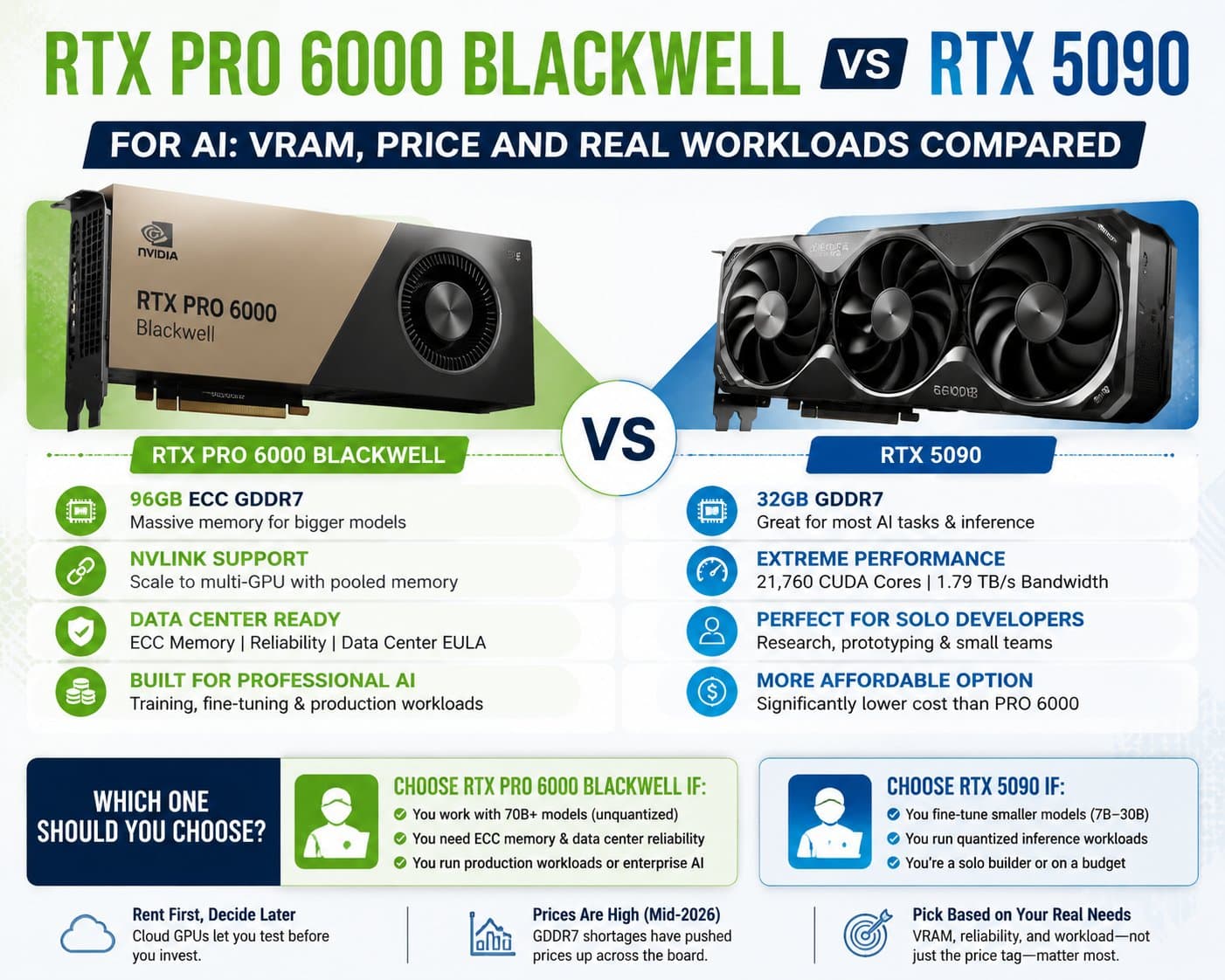
Photo shared by Prateek Navani: I've sat through a lot of "we'll deal with it later" conversations about India's data protection law
PN
Prateek Navani@prateek· August 7 at 1:17 PM

AI hardware costs in 2026: what's driving GPU prices up

If you have priced out a GPU recently, whether for gaming, a workstation, or an AI project, you already know something has changed. Prices are continuously rising. In short: GPU prices are surging in 2026 because massive AI data center demand has triggered a global memory shortage. AI infrastructure absorbs a huge share of high-end memory, including HBM, GDDR6, GDDR7, and DDR5, leaving far less supply for consumer and enterprise hardware and pushing manufacturing costs up sharply. This is not a short-term blip caused by one product launch or one bad quarter. It is a structural shift in how memory gets made and who gets it first. AI data centers are eating the memory supply Every GPU, whether it is a gaming card or a data center accelerator, needs memory to function. For years, memory manufacturers split their factory output between commodity memory for PCs and consoles, and higher-end memory for servers and specialized hardware. That balance has broken down. Samsung, SK Hynix, and Micron are the three companies that make the vast majority of the world's DRAM. In 2026, all three have been shifting factory capacity toward high bandwidth memory, or HBM, the memory format that powers AI accelerators. HBM is significantly more profitable per wafer than standard DDR5. When a manufacturer has to choose between a highly profitable product with guaranteed demand from hyperscalers and a lower-margin product for the consumer market, the choice is not close. Industry estimates suggest AI data centers could absorb around 70% of global high-end memory output in 2026, up from roughly 20 to 30% just a few years ago. The result is a squeeze that started in enterprise memory and spread into gaming GPUs, laptops, and even game consoles, because they all draw from the same limited fabs. Core drivers of higher GPU prices AI memory squeeze This is the primary driver. AI infrastructure providers are willing to pay a premium for guaranteed memory supply, and manufacturers are prioritizing that demand over consumer-facing products. Every wafer redirected to HBM production is a wafer that does not become standard GPU or system memory. Rising component costs Memory now represents a much larger share of total GPU production cost than it did even a year ago. Contract pricing for both DDR5 and HBM has climbed sharply through 2026, and fixed-price memory agreements that GPU makers relied on in prior years have expired, exposing them to current market rates. When the input cost rises this much, manufacturers pass at least part of that increase on to buyers. Extended lead times Manufacturing allocation has become unpredictable. Lead times for high-demand GPU architectures have stretched well beyond historical norms, in some cases reaching several months from order to delivery. Longer lead times make planning harder for both individual buyers and businesses trying to provision infrastructure on a schedule. Stretched product roadmaps Planned refreshes and next-generation consumer GPU releases have faced delays. When fewer new products enter the market on schedule, there is less competitive pressure to bring prices down, and older inventory stays priced higher for longer than it normally would. What this means if you are planning AI infrastructure For businesses building or scaling AI workloads, this shortage changes the calculation around buying versus renting compute. High-end accelerators built for AI training and inference carry large amounts of premium memory by design. A single data-center-grade accelerator can include well over 100GB of HBM, which is part of why enterprise AI hardware has been hit especially hard by the same shortage affecting consumer cards. If you are planning capacity around a specific accelerator like the H200 GPU, it is worth checking current, real pricing directly rather than budgeting off numbers from even a few months ago, since this market is moving quickly. For many businesses, the more practical path in 2026 is not buying hardware outright. Renting GPU capacity from a cloud provider avoids the upfront capital cost of hardware whose price could still be climbing when it arrives, and it avoids the multi-month wait that direct purchases now often involve. There is also a depreciation risk worth considering. Hardware bought today at an inflated price does not become cheaper to have owned if prices ease later. A rented or reserved cloud allocation shifts that risk to the provider, who can adjust capacity and pricing across a much larger pool of customers than a single business managing its own hardware refresh cycle. How to plan around rising GPU and memory costs Budget for volatility, not a fixed number: Get current pricing before finalizing any hardware budget. A quote from even two or three months ago may already be outdated. Separate your always-on needs from your burst needs: If your AI workload runs steadily, a dedicated or reserved allocation can be more cost-predictable than pure on-demand pricing during a period of rising rates. If your workload spikes occasionally, on-demand or rented capacity avoids overcommitting to hardware you will not use consistently. Ask about lead times before committing to a purchase date: If a project timeline depends on receiving specific hardware, confirm current lead times with the vendor directly rather than assuming they match what was normal a year ago. Reconsider memory requirements realistically: Not every workload needs the newest, highest-memory card available. Right-sizing memory to the actual workload can meaningfully reduce cost exposure during a period when memory itself is the most expensive component. Watch supplier announcements, not just price trackers: Manufacturer decisions, like shifting production priorities or retiring certain consumer product lines, tend to signal where prices are headed before that shows up in retail pricing. The bottom line The GPU price increases in 2026 are not about one company raising prices for its own reasons. They trace back to a single, structural cause: AI infrastructure needs more high-end memory than the world's fabs can currently produce, and consumer and enterprise GPU buyers are competing for what is left. Understanding that root cause helps you plan better, whether that means budgeting for volatility, timing a purchase, or shifting toward rented cloud capacity instead of owned hardware while the market works through this shortage.

Photo shared by Prateek Navani: If you have priced out a GPU recently, whether for gaming, a workstation, or an AI project, you alre