VI
Vidyalaya School Software is the best School Management Systems Trusted by 2000+ Schools and awarded as "Most Innovative School Management ERP", Go online with Vidyalaya Cloud School ERP.
https://www.vidyalayaschoolsoftware.com/@VidyalayaschoolSoftware
Vidyalaya School Software is the best School Management Systems Trusted by 2000+ Schools and awarded as "Most Innovative School Management ERP", Go online with Vidyalaya Cloud School ERP.
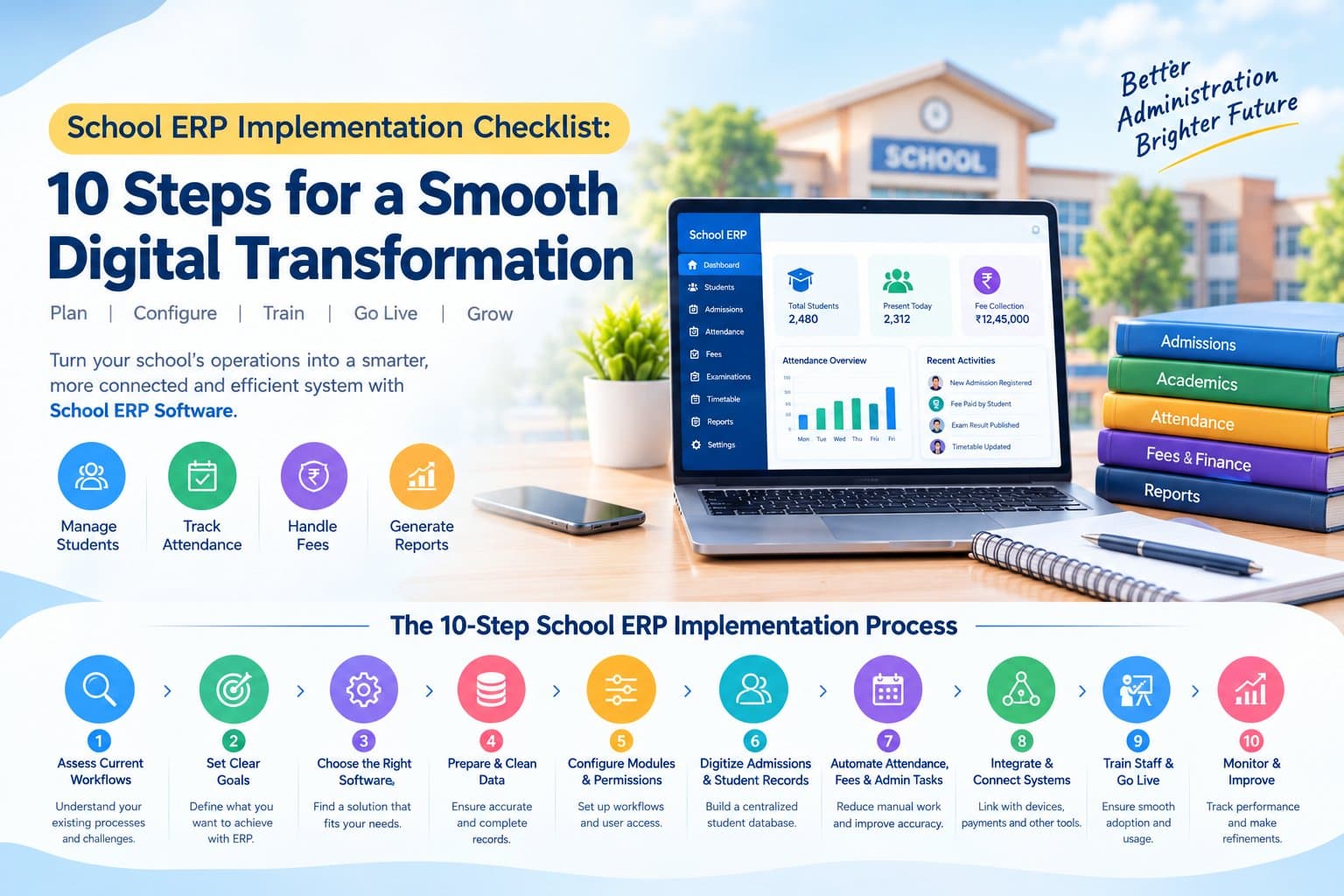
https://www.vidyalayaschoolsoftware.com/Implementing School ERP Software is an important decision for schools that want to manage admissions, attendance, fees, academic activities, staff records, and parent communication through a connected digital platform. However, successful implementation involves more than selecting software. Schools must understand their existing workflows, prepare accurate data, train staff, and ensure that the system supports their daily administrative requirements. Without proper planning, even a feature-rich platform can face adoption challenges, inconsistent records, and delays during rollout. A structured implementation plan helps schools introduce new technology with fewer disruptions and establish a reliable foundation for digital administration. This guide explains ten practical steps to help schools plan and execute a School ERP implementation effectively. What Is School ERP Implementation? School ERP implementation is the process of configuring, deploying, and adopting an integrated software platform to manage a school's administrative and academic operations. Depending on the selected solution, it can bring together student information, admissions, attendance, fee management, examinations, timetable planning, human resources, reporting, and communication. Instead of maintaining separate spreadsheets, registers, and disconnected applications, schools can use centralized workflows to organize information and coordinate activities between departments. A platform such as Vidyalaya School Management Software provides modules for key school operations, allowing institutions to evaluate an integrated approach to administration. 10 Steps for Successful School ERP Implementation 1. Assess Your School's Existing Workflows Before choosing software, examine how the school currently handles administrative and academic tasks. Identify processes that rely on paper registers, repeated data entry, manual calculations, or separate applications. Review areas such as: Student admissions and enrollment Student profiles and document management Daily attendance and absence reporting Fee collection and financial records Examination scheduling and report cards Timetable planning and teacher allocation Staff records, leave, and payroll Parent communication and administrative reporting Speak with principals, teachers, accountants, admission staff, and administrators to understand their daily challenges. This assessment helps define the requirements the ERP system must address. 2. Define Clear Implementation Goals Once the current processes are documented, establish measurable objectives for the new system. Goals should reflect actual school needs rather than simply the number of features available. For example, a school may aim to reduce repetitive data entry, standardize fee receipts, make attendance reports easier to access, or centralize student records. Define a baseline wherever possible. If staff currently spend a certain number of hours preparing monthly reports, record that figure and compare it with the process after implementation. Clear objectives help school management evaluate whether the selected software delivers practical value. 3. Select School ERP Software That Fits Your Requirements Not every school needs the same modules or workflows. A smaller institution may prioritize student records, attendance, fees, and parent communication, while a larger school may require additional capabilities for transport, inventory, library management, human resources, and multi-campus reporting. Evaluate the following before making a decision: Essential modules and customization options Ease of use for teachers and administrative staff Parent and student access Reporting and dashboard capabilities Integration with existing devices and applications Data security, user permissions, and backup procedures Implementation support and staff training Total ownership costs, including maintenance and integrations Request a product demonstration and test common tasks using realistic scenarios. Review Vidyalaya School ERP to assess its suitability for your school's requirements. 4. Prepare and Clean Existing Data Data migration is one of the most important stages of ERP implementation. Student records, guardian details, staff information, fee balances, attendance history, and other existing data may be stored in different formats. Before importing information: Remove duplicate and obsolete records where appropriate. Standardize names, dates, class identifiers, and contact details. Verify outstanding fee balances and relevant financial records. Organize student documents and staff information. Define which historical records must be retained. Assign authorized staff to validate migrated data. Run a test migration before importing the complete dataset. After migration, compare sample records against the original sources and resolve discrepancies before the system becomes the primary recordkeeping platform. 5. Configure Modules and User Permissions Once the software is selected and data is prepared, configure the platform according to the school's administrative structure. Set up academic sessions, classes, sections, subjects, fee categories, attendance rules, examination formats, and reporting requirements. Configure each module based on the school's actual policies. User permissions are equally important. Teachers should access the information required for their responsibilities, while accountants, admission staff, principals, and administrators may need different levels of access. Role-based permissions help limit unnecessary access to sensitive information and establish clearer responsibility for administrative actions. 6. Digitize Admissions and Student Management Admissions and student records are central to school administration. During implementation, define how inquiry records become applications, how documents are verified, and how confirmed students are added to the student database. A structured process can help reduce duplicate entries and maintain continuity between admission and student management. Schools should verify that the system can handle relevant details such as guardian information, student photographs, documents, class allocation, roll numbers, and admission status. Institutions with a high volume of admission inquiries can also evaluate Vidyalaya Admission CRM Software for lead tracking, follow-ups, and admission workflow management. 7. Automate Attendance, Fees, and Routine Administration After essential records are ready, configure high-frequency workflows that staff use every day. For attendance, define how teachers record student presence, how absences are reported, and which notifications should be sent to parents. For fees, configure payment categories, concessions, receipts, outstanding balances, and reporting procedures. Schools should also test timetable generation, examination records, leave management, and other modules included in their implementation scope. Start by validating complete workflows rather than isolated features. For example, test whether an attendance entry appears correctly in reports and whether the relevant notification follows the school's configured rules. This approach helps identify process gaps before full deployment. 8. Integrate Communication Channels and Existing Systems An ERP system becomes more useful when relevant information can move between connected school operations. Depending on the selected software and available integrations, schools may connect attendance devices, online payment gateways, messaging services, learning platforms, or accounting tools. Before activating an integration, confirm: Which system is the source of truth for each data field How information is synchronized What happens when a synchronization fails Who receives error notifications How duplicate or conflicting records are resolved Which permissions apply to connected systems Test integrations using realistic scenarios and document the process for handling exceptions. Schools can review Vidyalaya's integration options to identify relevant connections. 9. Train Staff and Launch in Phases Staff adoption has a direct effect on implementation quality. Even a well-configured system can produce inconsistent records if users do not understand how to perform their tasks. Provide role-specific training for teachers, admission teams, accountants, administrators, and school leadership. Use practical examples rather than relying only on feature presentations. A phased rollout can reduce risk. For example, a school may begin with student records and attendance, then introduce fee management and academic reporting after validating the initial workflows. During the rollout, provide a clear channel for reporting issues and assign responsible team members to resolve them. A short reference guide for common tasks can also help staff become comfortable with the new process. 10. Monitor Performance and Refine Workflows Implementation should not end on the launch date. Review system usage, record accuracy, support requests, and progress against the objectives defined at the beginning. Useful indicators include: Time required to prepare attendance and administrative reports Accuracy and completeness of student records Number of duplicate or incorrect entries Time taken to process admission applications Frequency of unresolved system issues Staff adoption and training completion Parent access and communication activity Collect feedback from users and prioritize changes that address recurring problems. Review access permissions periodically, verify backup procedures, and keep staff informed about workflow updates. Continuous evaluation helps the school adapt its ERP setup as operational needs change. Common School ERP Implementation Challenges and How to Address Them Even with a clear plan, schools may encounter obstacles during deployment. Incomplete or inconsistent data: Prepare and validate records before migration, and assign ownership for correcting discrepancies. Resistance to new processes: Explain the reason for the change, involve staff in planning, and provide role-specific training. Unclear requirements: Document workflows and agree on implementation priorities before configuring modules. Integration problems: Test each connection before launch and define a process for handling synchronization errors. Limited time for training: Schedule practical sessions around staff responsibilities and provide follow-up support after launch. Unclear accountability: Appoint an internal project owner and define responsibilities for decisions, testing, data validation, and issue resolution. Planning for these challenges makes implementation more manageable and helps the school respond quickly when problems arise. How Vidyalaya Can Support Your School's Digital Transformation Vidyalaya School Software provides an integrated platform with modules for admissions, student management, attendance, fees, timetable management, assessments, human resources, payroll, and other school operations. Its modular approach allows schools to assess the capabilities relevant to their requirements and consider how different workflows can operate within a connected system. Before implementation, school management should identify its priorities, review available modules, validate integration requirements, and discuss data migration and staff training with the provider. To evaluate the platform for your institution, visit Vidyalaya School Management Software or request a demo. Conclusion Successful School ERP implementation depends on planning, accurate data, appropriate configuration, staff training, and continuous evaluation. By assessing existing workflows, defining clear objectives, selecting suitable software, and introducing modules in a structured sequence, schools can make the transition to digital administration more manageable. The most effective implementation is one that fits the school's real operational needs and supports consistent processes across departments. With clear ownership and ongoing monitoring, a School ERP system can provide a stronger foundation for managing student information, administrative tasks, and school communication. Planning to digitize your school operations? Evaluate your requirements, prepare your implementation checklist, and explore Vidyalaya's School ERP capabilities to determine the right next step for your institution.