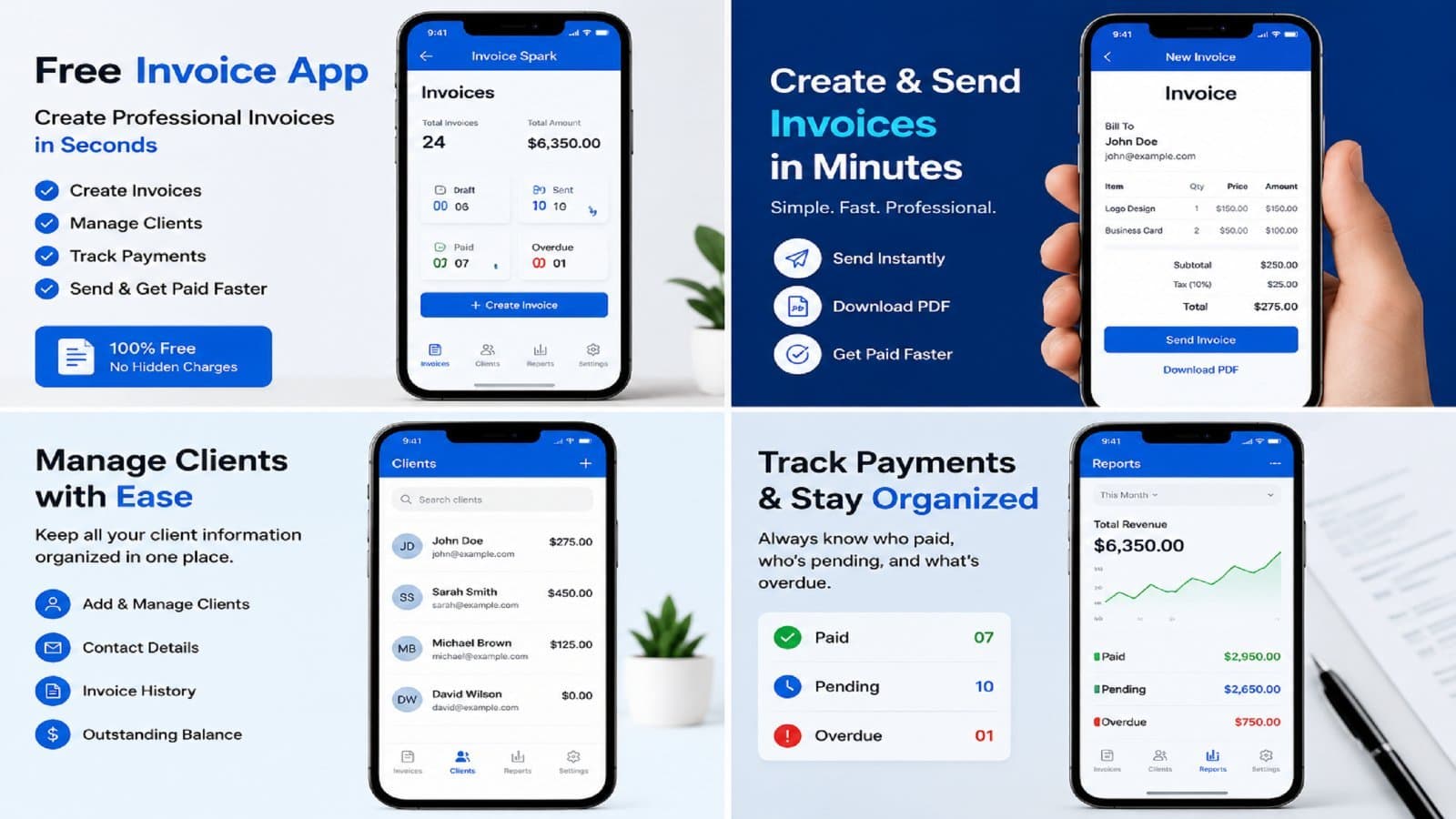
Introduction Invoicing is an important part of running a business, but traditional billing methods can take valuable time. Freelancers and small business owners may need to prepare invoices while traveling, meeting customers, completing projects, or working from home. A mobile invoicing app can make these tasks easier by bringing essential billing tools to a smartphone. Instead of waiting until you reach a computer, you can prepare an invoice, review customer details, and organize billing information from your mobile device. For freelancers, contractors, consultants, and small businesses, mobile invoicing offers flexibility and convenience. Invoice Spark provides a simple approach to mobile billing, helping users manage routine invoicing tasks in a more organized way. What Is a Mobile Invoicing App? A mobile invoicing app is software designed to help users manage invoices and basic billing tasks through a smartphone or tablet. Traditional invoicing may require spreadsheets, documents, or desktop accounting programs. Mobile invoicing tools bring many common billing tasks into one convenient location. Depending on the application, you may be able to: Add customer information Add products and services Enter quantities and prices Calculate invoice totals Apply taxes or discounts Create professional invoices Save invoice records Share invoices with customers Review previous billing activity The features available can vary between apps, so businesses should select a solution that matches their specific workflow. 7 Powerful Benefits of Mobile Invoicing 1. Create Invoices Anywhere One of the main advantages of mobile billing is accessibility. Business owners are not always sitting behind a desk. A freelancer might finish a project at a customer's office. A contractor might complete a job at a client's property. A consultant may work from several locations during the week. With mobile invoicing, users can prepare invoices from their smartphones when it is convenient. This can help reduce delays between completing work and sending a bill. 2. Save Valuable Time Manual invoice creation can involve repetitive tasks. You may need to enter the same client information, service descriptions, prices, and payment details repeatedly. A mobile billing application can make this process more efficient by allowing users to save frequently used information. A simple workflow may look like: Select client → Add service → Enter price → Review → Send This reduces unnecessary steps and can make routine invoicing easier. 3. Helpful for Freelancers Freelancers often manage every part of their business themselves. They may be responsible for finding clients, completing projects, sending invoices, and following up on payments. An invoice maker for freelancers can make billing easier by providing tools designed around individual clients and projects. For example: A graphic designer can bill for a completed design project. A writer can invoice for articles or content packages. A developer can bill for website development. A photographer can invoice after completing an event. A consultant can bill for professional services. Mobile access can make invoicing fit naturally into a freelancer's daily workflow. 4. Manage Clients More Efficiently Customer information is an important part of invoicing. An invoice app with client management can help users save customer information and connect it with billing records. Instead of entering the same details every time, users may be able to select an existing client. Depending on the app, client records may contain: Customer name Email address Phone number Billing information Previous invoices Project information Organizing these details can make repeat invoicing more convenient. 5. Convenient Android Billing Android smartphones are widely used for business and personal tasks. An invoice app for Android can give business owners access to billing tools through a device they already use every day. This is especially helpful for people who work outside an office. For example, a service provider can complete a job, open the billing app, enter the service details, review the total, and prepare the invoice without returning to a desktop computer. 6. Reduce Paperwork Paper invoices can become difficult to organize as a business grows. Digital invoicing can reduce the need for printed documents and make invoice records easier to manage. Instead of searching through physical folders, users can use digital records according to the features offered by their invoicing application. Reducing paperwork can also make a business's billing workflow feel more organized. 7. Explore Flexible Pricing Options Software costs are an important consideration for small businesses. Some users specifically look for an invoice app no subscription because they want to avoid recurring monthly or annual charges. However, invoicing apps use different pricing models. Some offer free plans, one-time purchases, optional upgrades, or subscription packages. Before choosing an application, check: Whether a subscription is required Which features are included Whether there are usage limits Whether templates are available Whether client management is included Whether invoices can be saved or shared Choose a pricing model that fits your business needs and budget. How to Use a Mobile Invoicing App Getting started with mobile billing is usually straightforward. Step 1: Choose Your App Select an invoicing solution that works with your smartphone and provides the features you need. Step 2: Add Business Information Enter your business name and other relevant details. This information can help create consistent invoices. Step 3: Add a Customer Select an existing client or create a new customer record. Check the contact information carefully. Step 4: Add Products or Services Describe the work or products you are billing for. Use clear descriptions so customers can understand the charges. Step 5: Enter Pricing Add the quantity, rate, taxes, discounts, or other applicable amounts. Step 6: Review the Invoice Before sending, check: Customer information Invoice number Invoice date Service description Prices Taxes Discounts Final total Payment information Step 7: Save or Send Once everything is correct, save the invoice for your records or send it to the customer using the available sharing options. Features to Look for in a Mobile Billing App Different businesses have different requirements. Important features may include: Professional Invoice Templates Templates can help businesses create clear and consistent invoices. Client Management A customer database can simplify repeat billing. Invoice History Easy access to previous invoices can help with record keeping. Simple Interface A straightforward interface makes mobile invoicing easier to learn and use. Android Compatibility Android users should ensure that the application supports their device. Flexible Pricing Compare free, one-time, and subscription-based options carefully. Secure Data Handling Customer and financial information should be handled responsibly. Review the application's privacy and security information before using it for business data. Who Can Benefit From Mobile Invoicing? Mobile billing tools can be useful for many professionals. Freelancers Writers, designers, developers, marketers, photographers, and consultants can manage client invoices from their phones. Contractors Contractors can prepare invoices after completing jobs at customer locations. Small Business Owners Small businesses can organize customer billing without relying entirely on desktop systems. Consultants Consultants working from different locations can handle billing remotely. Independent Service Providers Tutors, cleaners, trainers, technicians, and other service providers can use mobile tools to simplify everyday invoicing. Best Practices for Better Mobile Invoicing A good invoicing process should focus on accuracy and consistency. Follow these simple practices: Use unique invoice numbers. Keep customer details updated. Describe products and services clearly. Check calculations before sending. Use consistent invoice templates. Include payment terms when appropriate. Keep invoice records organized. Review outstanding invoices regularly. Protect customer information. These habits can help create a more professional billing process. Why Choose Invoice Spark? Invoice Spark is built around the idea of making everyday invoicing simpler and more accessible. For freelancers, an invoice maker for freelancers can help organize client billing. Android users can benefit from an invoice app for Android that makes billing available from their mobile device. Businesses that need an invoice app with client management can keep customer information connected with their invoicing workflow. The goal is to reduce unnecessary administrative work and help users spend more time on their actual business activities. Frequently Asked Questions What is a mobile invoicing app? A mobile invoicing app is software that lets users create, manage, save, and share invoices using a smartphone or tablet. Can freelancers use mobile invoicing apps? Yes. Freelancers can use mobile billing tools to create invoices, manage clients, and organize billing while working from different locations. Can I create invoices on Android? Yes. Many Android invoicing applications allow users to enter customer and service information and prepare invoices directly from their phones. What is an invoice maker for freelancers? An invoice maker for freelancers is a billing tool that helps independent professionals create and manage invoices for their clients. What does an invoice app with client management do? It combines invoicing features with customer information management, making it easier to keep client details and billing records together. Is there an invoice app with no subscription? Some applications offer free or non-subscription pricing, while others require recurring payments. Always check the current pricing and terms before selecting an app. What should a professional invoice contain? A professional invoice usually includes business details, customer information, invoice number, date, product or service descriptions, prices, total amount, and payment information. How can mobile invoicing save time? Saved client details, reusable services, templates, and simple workflows can reduce repetitive data entry and speed up routine billing. Conclusion A smartphone can be more than a communication device for a business. With the right billing tools, it can also become a convenient way to manage everyday invoicing. A mobile invoicing solution allows freelancers, contractors, consultants, and small businesses to Create invoices, manage customers, and organize billing without always depending on a desktop computer.
https://invoicespark.bytesflux.com/